
General Labs Cloud
Build and run your own labs
Pittsburgh, PA
info

Qian's Lab for MRI: Products and Services
Our lab provides the following products and services. Under each item there is a brief description and the way for you to approach to it.
Product: pM1 software for single-component T2 (T2*/T1rho) mapping, v2014a, 64-bit PC, Windows 7 or up
pM1 is a MATLAB-based standalone deployment which can run in a personal computer without MATLAB installed in it. pM1 is used to perform T2/T2*/T1rho mapping on MRI images in DICOM format. pM1 performs curve fitting to a model of one-term exponential decay, s(t) = A*exp(-t/T2) + n(t), on a pixel-by-pixel basis in a region of interest (ROI). It produces three maps: T2 (T2* or T1rho) map, intensity A map, and R-square (R2) map. pM1 also calculates the mean and standard deviation (SD) of T2 (T2* or T1rho) in a user-defined ROI. This software package includes a user manual which details how to install and run pM1 on your computer. pM1 has no function for motion correction.
If you have any questions about pM1, please contact the developer, Dr. Yongxian Qian, PhD, via email: qiany@glabscloud.com.
a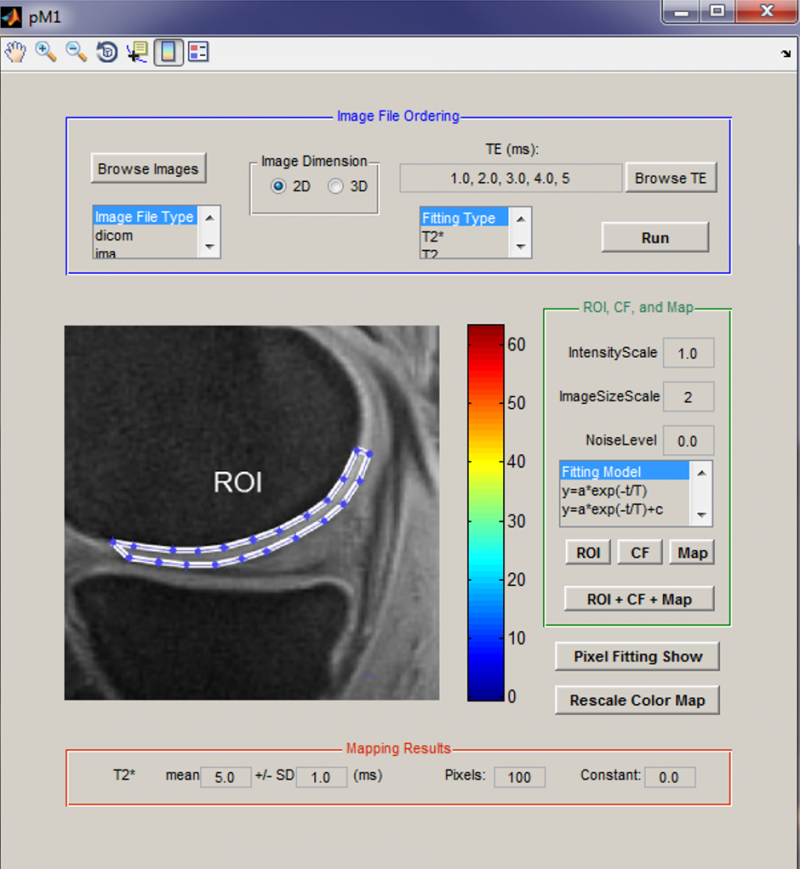 b
b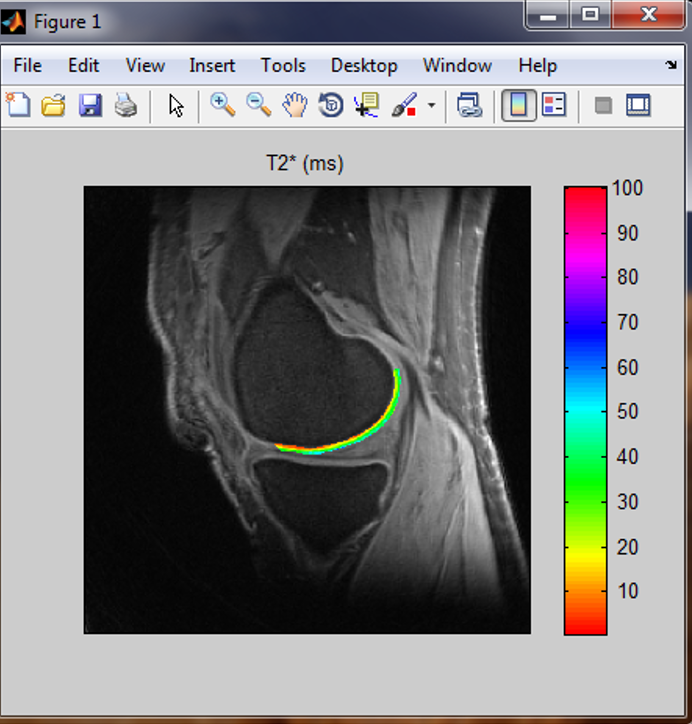 c
c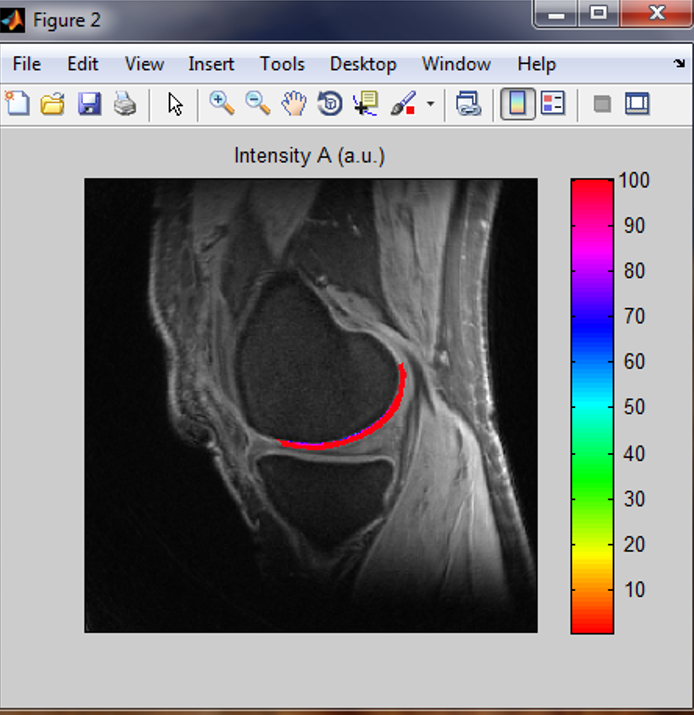 d
d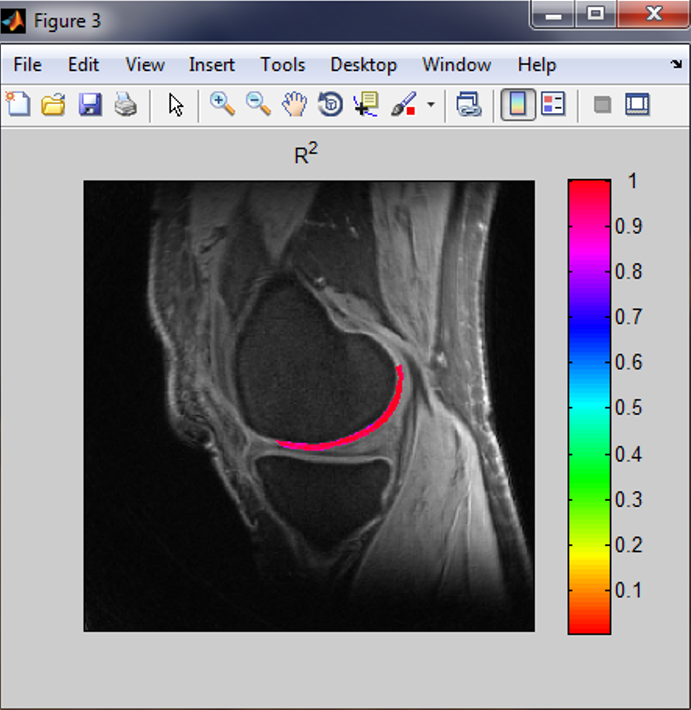
Figure 1. pM1 software and its output maps. (a) pM1 panel, (b) T2* map, (c) A map, and (d) R2 map.
1-month lease for pM1 (This software will be sent to you via your contact email in your payment)- $
- In stock
6-month lease for pM1 (This software will be sent to you via your contact email in your payment)
- $
- In stock
12-month lease for pM1 (This software will be sent to you via your contact email in your payment)
- $
- In stock
2-year lease for pM1 (This software will be sent to you via your contact email in your payment)
- $
- In stock
- 5-year lease for pM1 (This software will be sent to you via your contact email in your payment)
- $
- In stock
Product: rbMC software for motion correction in T2 (T1) mapping, v2014a, 64-bit PC, Windows 7 or up
rbMC is a MATLAB-based standalone deployment which can run in a personal computer without MATLAB installed in it. rbMC performs rigid-body motion correction between MRI images in parameter mapping such as T2, T2*, T1 or T1rho. rbMC corrects motion across images for a ROI through translating, rotating and scaling ROI. Thus, rbMC is robust to pattern change of intensity contrast across images in mapping. It produces motion-corrected images, as well as difference images before and after motion correction. It
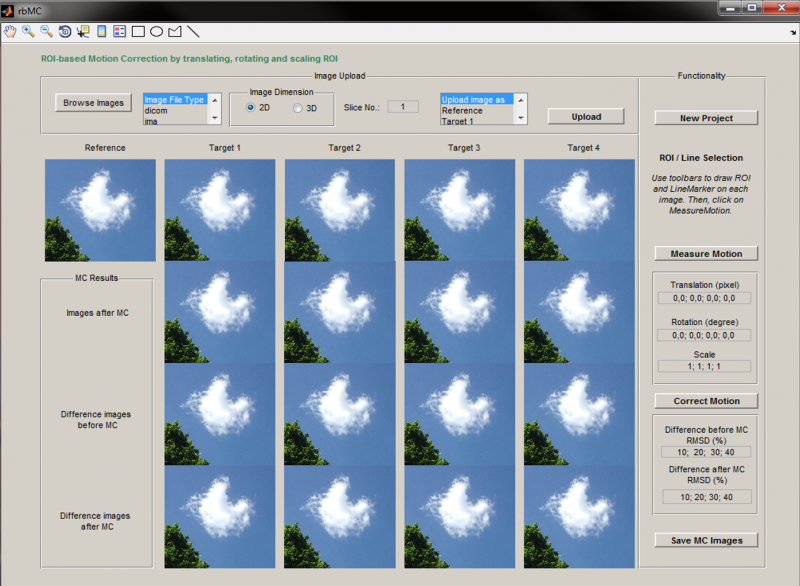 also quantifies the quality of performnce by evaluating the root mean squared difference (RMSD) between reference and corrected images. The software package includes a user manual which details how to install and run rbMC on your computer.
If you have any questions about rbMC, please contact the developer, Dr. Yongxian Qian, PhD, via qiany@glabscloud.com.
Figure 3 (Left). rbMC software panel.
1-month lease for rbMC (This software will be sent to you via your contact email in your payment)- $
- In stock
6-month lease for rbMC (This software will be sent to you via your contact email in your payment)
- $
- In stock
12-month lease for rbMC (This software will be sent to you via your contact email in your payment)
- $
- In stock
Product: pM2 software for bi-exponential T2* (T2) mapping, v2014a, 64-bit PC, Windows 7 or up
pM2 is a MATLAB-based standalone deployment which can run in a personal computer without MATLAB installed in it. pM2 performs curve fitting to a model of two exponential decays and one constant term: s(t) = A21*exp(-t/T21) + A22*exp(-t/T22) + C + n(t), on a pixel-by-pixel basis in a region of interest (ROI). pM2 uses an iterative NNLS (non-negative least squares) algorithm to search the best fitting at each pixel. It produces seven maps: a21, T21, a22, T22, T2mono, and two R-square (R2). pM2 also calculates the mean and standard deviation (SD) of these fitted parameters
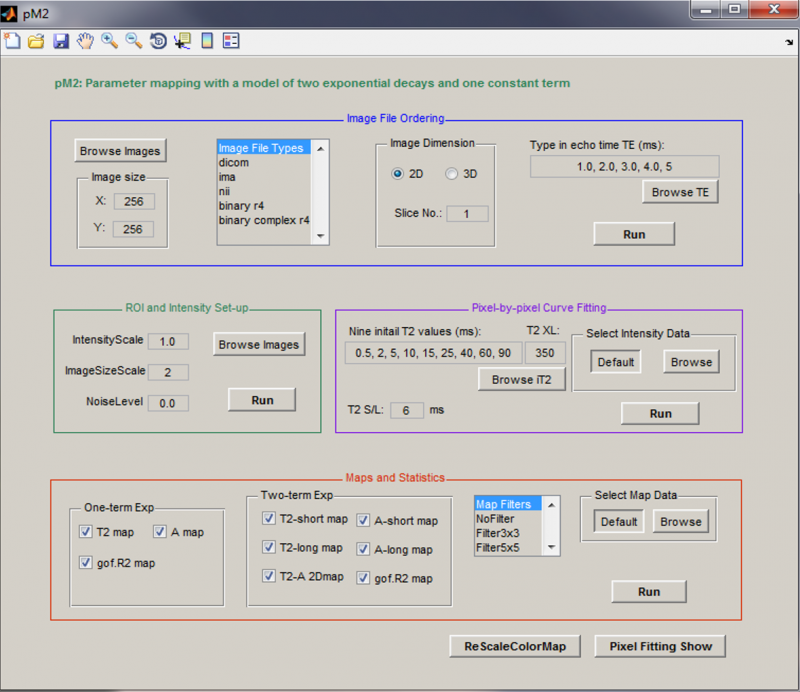 in a user-defined ROI. To define ROI, a separate software will be provided to you for free. An example of pM2 mapping is shown in Figure 2 below. The software package includes a user manual which details how to install and run pM2 on your computer.
If you have any questions about pM2, please contact the developer, Dr. Yongxian Qian, PhD, via qiany@glabscloud.com.
Figure 4 (left). pM2 software panel.
1-month lease for pM2 (This software will be sent to you via your contact email in your payment)- $
- In stock
6-month lease for pM2 (This software will be sent to you via your contact email in your payment)
- $
- In stock
12-month lease for pM2 (This software will be sent to you via your contact email in your payment)
- $
- In stock
Service: pM1 single-component T2 (T2*/T1/T1rho) mapping
Uploading your DICOM images is required. Curve fitting to a single-component model: s(t) = A*exp(-t/T2) + n(t). Produce three maps: T2, A, and R-square (R2). Calculate the mean and standard deviation of T2 in a user-defined ROI. To define ROI, a separate software will be provided to you for free. An example of pM1 mapping is shown in Fiure 1 above.
If you have any questions about this service, please contact the provider, Dr. Yongxian Qian, PhD, via email: qiany@glabscloud.com.
1 ROI (For uploading your images, we will contact you via your email in your payment. If motion is detected between the images, the mapping will not be performed untill motion correction is ordered.)- $
- Available
Service: pM2 two-component T2 (T2*) mapping
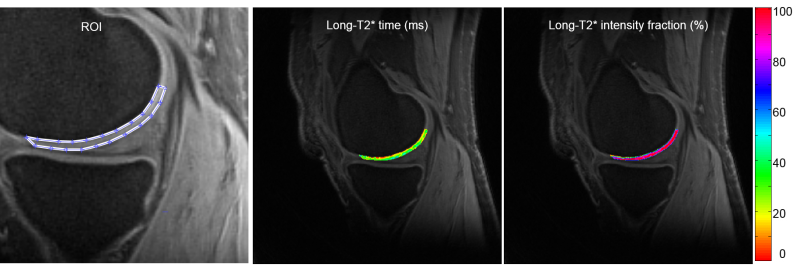
Uploading your DICOM images is required. Curve fitting to a two-component model: s(t) = A21*exp(-t/T21) + A22*exp(-t/T22) + C + n(t), on a pixel-by-pixel basis in a region of interest (ROI). Use an iterative NNLS (non-negative least squares) algorithm for the fitting at each pixel. Produce seven maps: a21, T21, a22, T22, T2mono, and two R-square (R2). Calculate their means and standard deviations (SD) in a user-defined ROI. To define ROI, a separate software will be provided to you for free. An example of pM2 mapping is shown in Figure 2 below.
If you have any questions about this service, please contact the provider, Dr. Yongxian Qian, PhD, via email qiany@glabscloud.com.a
 b
b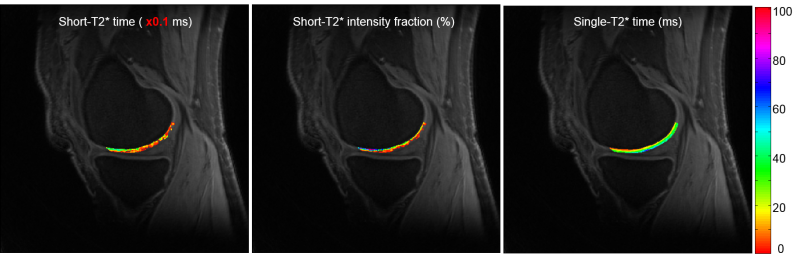
Figure 2. pM2 bi-component T2* mapping. (a) ROI, long-component T2* time and intensity fraction, (b) short-component T2* time, intensity fraction, and single-component-fitted T2* time.
1 ROI (For uploading your images, we will contact you via your email in your payment. If motion is detected between the images, the mapping will not be performed until motion correction is ordered.)- $
- Available
Service: rbMC ROI-based motion correction across images in T2 (T1) mapping by translating, rotating and scaling ROI.
Uploading your DICOM images is required. Correct motion across images for a ROI by translating, rotating and scaling ROI. Produce motion-corrected images and evaluate the quality of motion correction through a ROI-based root mean squared difference (RMSD) between reference and corrected images. To define ROI, a separate software will be provided to you for free. The panel of rbMC is shown in Fiure 3 above.
If you have any questions about this service, please contact the provider, Dr. Yongxian Qian, PhD, via email: qiany@glabscloud.com.
1 ROI per target image (For uploading your images, we will contact you via your email in your payment)- $
- Available
Pittsburgh, PA
info